
awake · lid open
Agent working
A task kicks off
Your agent kicks off a run: a build, a test suite, one of those refactors that takes a while. The lid is open and nothing dramatic has happened yet.
Step 1 of 5
HoldMyCode blocks sleep only while your coding agent is actually running a task, whether the lid is open, closed, or halfway into your bag. The moment it goes idle, it hands sleep back to macOS and gets out of your way.
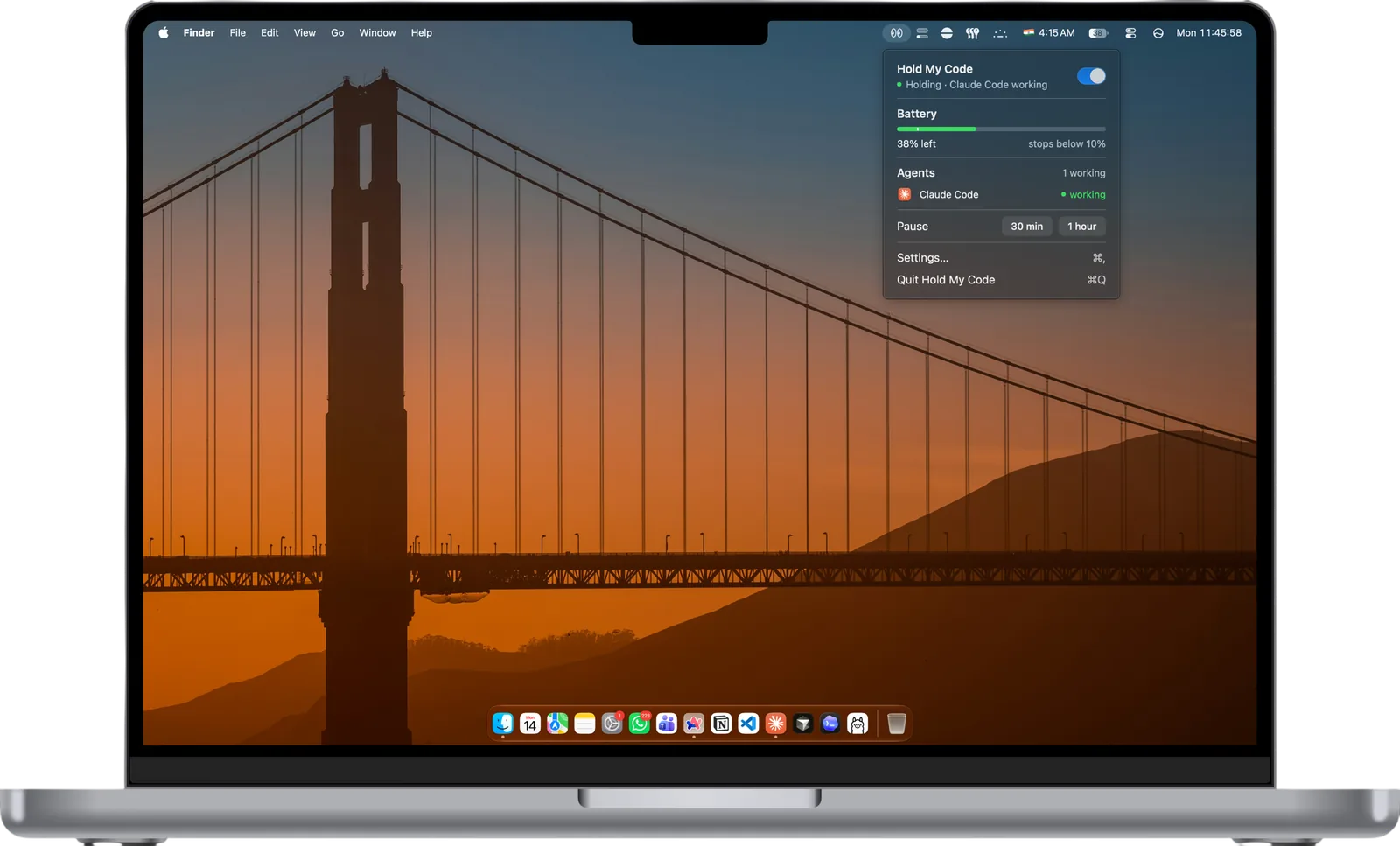
HoldMyCode holding the wake lock while Claude Code works
How it works
Five steps, start to finish. Here's what actually happens when you slam the lid shut in the middle of a run.
Agent working
Your agent kicks off a run: a build, a test suite, one of those refactors that takes a while. The lid is open and nothing dramatic has happened yet.
Step 1 of 5
Agent working
Normally this is where the run quietly dies. macOS sees the lid close and starts tucking the machine into bed.
Step 2 of 5
Holding
The helper blocks lid sleep for as long as the agent keeps working. The screen is dark, the laptop is in your bag, and the run carries on.
Step 3 of 5
Agent idle
The lifecycle hook reports idle. A 30 second grace timer starts, in case another tool call is about to land.
Step 4 of 5
Asleep
Nothing left to hold. HoldMyCode lets go and your Mac sleeps on its normal schedule, with no stray assertion quietly keeping it up all night.
Step 5 of 5
Features
Everything here answers one question well: is an agent working right now, and should this Mac stay up for it?
The Mac stays up only while a watched agent is actually working. An agent sitting idle at a prompt, waiting on you, gets no wake lock at all, and your machine sleeps like it normally would.
Lifecycle hooks report working and idle per session, so HoldMyCode knows the difference between a busy agent and a process that merely happens to be running.
Set a percentage where the hold gives up, or restrict holds to when you're plugged in. Low Power Mode is respected rather than fought.
Planned: choose whether the display sleeps on lid close, dims while the agent runs, or shuts off a set number of seconds after the work finishes. Not in the app yet.
A banner, and an optional sound, when a hold starts, when it ends, and when your battery threshold cuts it short. You're never left guessing what the Mac decided behind your back.
Live status, elapsed hold time, battery level, and a master toggle, all one click from the menu bar. There's a global hotkey too, for when reaching for the mouse feels like too much.
Supported agents
We'd rather ship one integration that genuinely works than four that guess. Claude Code is wired up now. Everything else is planned, not shipped.
Claude Code
Lifecycle hooksCodex
Coming soonGemini CLI
Coming soonCursor
Coming soonCline
Coming soonLifecycle hooks means a real working / idle signal today. Dashed tags are roadmap items with no integration yet.
Getting started
No config file, no per project setup, no dashboard to keep an eye on. Three steps and it's running.
Open the download and drop HoldMyCode into your Applications folder. It lives up in the menu bar, with no dock icon, no window to manage, and nothing to keep open.
macOS asks for your admin password the first time you launch it. That's HoldMyCode installing the small privileged helper that can hold lid sleep open, which is the one thing a normal app isn't allowed to do. It asks once, not every single launch.
That's the whole setup. Kick off a run in your agent and shut the laptop. The menu bar takes it from there. Nudge the battery floor later if the default doesn't suit you.
Nothing to sign up for, and nothing running until an agent actually starts working.
FAQ
Those keep your Mac awake for as long as you leave them switched on. The decision is yours, and the classic failure mode is forgetting to flip it off, then finding a hot, flat laptop at the bottom of your bag. HoldMyCode ties the wake lock to the agent instead. The hold exists only while a watched agent is in the middle of a task, and it ends by itself when the work does. Nothing to toggle, nothing to forget.
Yes. A plain sleep assertion isn't enough for a lid close, so HoldMyCode installs a small privileged helper that disables lid sleep while a hold is active and turns it back on the moment the hold ends. No external display, keyboard, or dongle required. macOS will ask for an admin password once, when the helper is installed.
No. The integration is a lifecycle hook that reports exactly one thing: whether a session just started working or just went idle. No prompt text, no file contents, no command output. The app has no account and no analytics inside it. The only part that ever talks to a server is this website, and all it does is keep an anonymous download count and, if you choose to leave it, your email for update notices.
Claude Code, through its lifecycle hooks. Codex, Gemini CLI, Cursor and Cline are on the roadmap but not wired up yet. If you run one of those today, HoldMyCode won't notice it working.
A threshold you pick. Below it, the hold releases and a notification tells you why. You can also restrict holds to times when you're on power, and HoldMyCode won't override Low Power Mode. Thermal pressure ends a hold too, rather than cooking the machine in a bag.
Free. No licence key, no trial timer, no surprise paid tier waiting in the wings. It's a small utility that does one job, and charging for it isn't the plan. The app is closed source, so that's a promise rather than something you can audit, but there's no account to create and nothing to cancel.
Download
No account, no licence key, no trial. Download it, drag it to Applications, done.
Requires
macOS 13 Ventura or laterApple silicon and Intel
Price
Free, foreverNo licence key, no trial, no tiers
On first launch
One admin promptInstalls the helper that manages lid sleep